Reason for this release (11/1/23):
– Bugfix, it throttled performance occasionally
Reasons for previous release (5/17/23):
– The 'extra blank lines' issue when printing programs in trace mode is a bug of printer 2E, not of this simulation,
– adapted for ooRexx 5.oo, fails now with earlier revisions.
For details see oo82162A.news.txt
(or online in here).
Note: afore using this program read the QPL public license in section 8.
TOC:
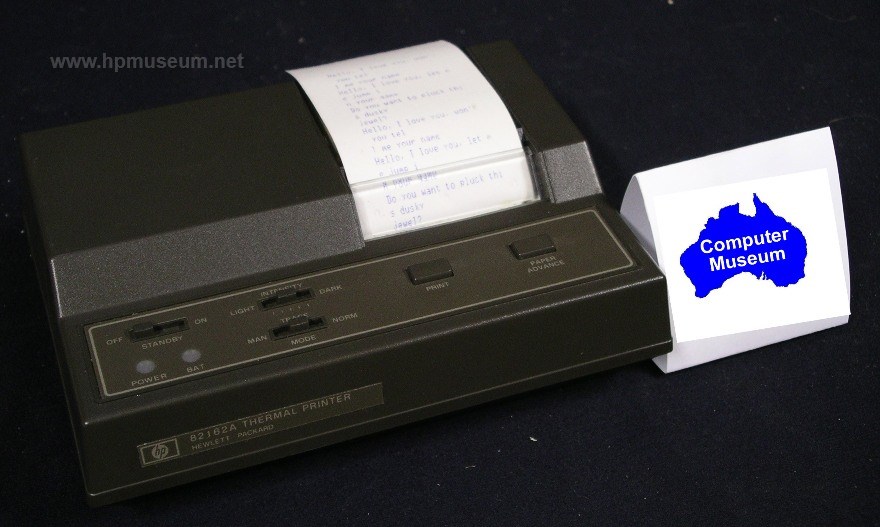
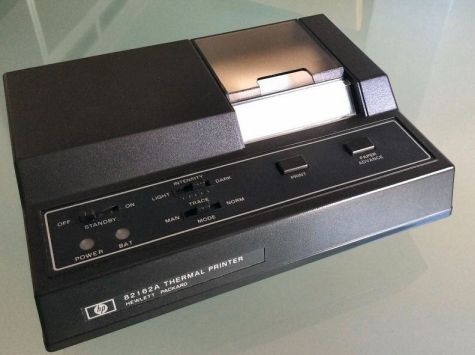
Some decades ago the Hewlett-Packard Company sold portable computing devices which connected printer, plotter, mass storage, measuring equipment, displays and more by a low-cost interconnection known as HP-IL. One of those devices was the 24 characters per line thermal printer HP-82162A.
Merely for nostalgic reasons I programmed a simulation of it using ooREXX under Windows. It connects by Virtual HP-IL to controllers like V41, Emu71, or Emu41 under DOSBox. Output is directed to an HP82240B Printer Simulator. Other receivers for print data are possible, see this example on z/VM.
Note: As anticipated from the very beginning of oo82162A it is almost obsolete by now since V41 comes with a simulation of the HP82143A which prints and plots perfectly like the role model. The only remaining distinguishing feature is the simple and pretty fast barcode printing.
To operate this virtual printer, you need either
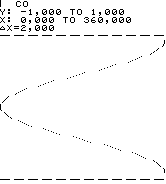
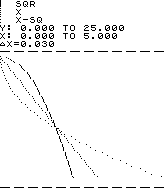
To print graphic on the a. m. HP82240B simulation - which offers just as the role model two graphic columns less than the HP82162A - it is advantageous to use a modified IL Printer ROM.
Start oo82162A.rxh either by
Depending on your settings in the INI file start of oo82162A will optionally also launch HP-82240B IR printer simulation. It optionally also launches the V41 emulator.
Notes:
Similar to the other side: the port number set in oo82162A.ini as 'export' must be used as in-port in the following post. The 'partner_dip' is the doted IP address of the computer running the following post. If it is the same one where you run oo82162A typically 127.0.0.1 is ok. In fact any IPv4 ID with 127 as first value will do. See 'Internal host loopback address' in http://tools.ietf.org/html/rfc1122.
Ensure your firewall allows traffic on all a. m. ports.
Start first the emulation or simulation of those posts which do not source IL frames at power on (sniffers and devices). As last post start the controller to ensure the loop is closed before the first frame travels the loop.
For other possible settings see the hints in oo82162A.ini.
For examples see the manuals mentioned in section 7.
Note: when printing program listings in trace mode the HP-41 inserts every now and then for unfathomable reasons a blank line too much before labels. I try to handle it, the result looks good, alas the interpretation of print data conducts also unwanted deviations from the role model's behaviour. This elimination of too much blank lines may be switched off, see Menu/Options/interpret PRT data. To observe the effect of this option I suggest to print in trace mode programs like HP or IG of PPCROM with and without the option set. Two consecutive blank lines are filtered and in addition for consecutive labels the blank line before the second and following labels is omitted.
The UDP datagrams forward the print data formatted for an HP82240B Printer Simulator. Without it (or a similar receiver) you will not see any print output. To present what was send to be printed is sole task of the UDP receiver.
In the INI file you may allow several trace options to see
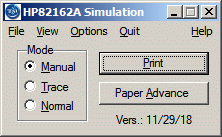
Keys: F1  - will show this help file (if you linked suffix HTM with a browser),
      F2  - displays the About information,
      F12 - or 's' (w/o quotes) shows the front panel,
      Alt - or F10 activate menu,
      Esc - ends the program.
Buttons: Same as role model (see note 2).
Mode group: Same as slider of role model.
Menu: Underscored letters indicate which key will launch the option when menu is activated
      File              - opens a sub-menu with just one item:
         Exit           - ends the program immediately
      View              - opens a sub-menu with following item:
         Front Panel... - show a front panel photo
      Options           - opens a sub-menu to pick:
         Cling V41+PR Windows - toggles "pop up follows oo82162A"
                                 (not available under Windows 10)
         Transliterate FPRDs - toggles change of First Page Regster Designations
         TCP/IP...      - choose in and out ports and out address of
                            Virtual HPIL and UDP address and port
      Quit              - prints buffer if applicable and ends program
      Help              - opens a sub-menu with following items:
         About...       - displays information about this program
         In detail...   - same as F1 pushed.
System Menu: as last items it offers TCP/IP... and About...
	which do the same as the menu items described above.
Notes:
I recommend to read the first one if you like to get an overview about the printer. The second is for those who like to build devices interfacing the HP-IL, virtual and others.
Everyone is permitted to copy and distribute this license document. The intent of this license is to establish freedom to share and change the software regulated by this license under the open source model.
This license applies to any software containing a notice placed by the copyright holder saying that it may be distributed under the terms of the Q Public License version 1.0. Such software is herein referred to as the Software. This license covers modification and distribution of the Software, use of third-party application programs based on the Software, and development of free software which uses the Software.
List of supplements:
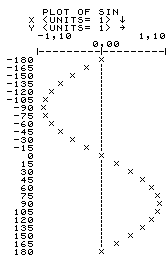 If you like to print graphics on the
IR printer simulation you should be aware of the minikin but annoying
difference between the printers 82162A and 82240B – the later offers only 166 dot columns per line.
With an HP41, virtual or real – "virtual is real" 1 –
I suggest to change the IL Printer ROM 2D (which IMO works better with printer 82162A than version 2E)
as follows2, 3 (values are hex, bar comments):
If you like to print graphics on the
IR printer simulation you should be aware of the minikin but annoying
difference between the printers 82162A and 82240B – the later offers only 166 dot columns per line.
With an HP41, virtual or real – "virtual is real" 1 –
I suggest to change the IL Printer ROM 2D (which IMO works better with printer 82162A than version 2E)
as follows2, 3 (values are hex, bar comments):
 @     old  new  comment
 60D4  013  012  in user code
 60D5  010  019  in user code
 612F  018  016  in user code
 6276  0A8  0A6  in MCode
 66B9  0A8  0A6  in MCode
 67B0  084  087  first line in CAT 2
 6FFB  004  007  now revision G
 6FFF  36A  362  chksm
With V41-IL (that is V41 R9 or newer) you may use in lieu of the HPIL.mod now nuil2ir.mod (the new il2ir.mod based on printer 2D) included in oo82162A.ZIP file.
Note: PPCROM routine "HP" (High resolution Plot) should be adjusted too if used in this V41-oo82162A-HP82240B setup.
Otherwise the different line pitch is quite incommodious, cf. fig. 1 and 2 of "HP" description in PPCROM manual p. 188f.

Produced with program "PRBC" (see HP82184A Plotter Module Owner's Manual, Section 7, p. 136) and the
HP82240B Printer Simulator.
May be used with either the
"Software Decoder for HP-41 Barcodes" of M. Hepperle,
or the "Software Defined Wand", an inclosure of my
NutEm/PC.
(The bar code shown above is the "%T" program to compute the percentage of a part in X from a total in Y.
Inverse of % function.
Example: 20% of 15 is 3, leave stack as is and XEQ "%T" returns 20.
Got it?)
/* SNFIR EXEC: show what's sent to the IR printer. MF 23.2.2013       */
/* with log of print stripe                                           */
/* new IP, old was 3.0.8.15. MF, 12.10.2014                           */
/* replaced not chop 16 by substr 17-*. MF, 25.07.2018                */

   dip = '172.18.23.33'               /* where to forward the traffic */
   pot = 5025                         /* port of receiver             */

   parse source . . sn st sm .        /* get fileID of this prgm      */
   if st = 'EXEC' then do             /* EXEC part starts here        */

/* define a vscreen to log and a window to show the print stripe      */
      'PIPE(sep ! end ?) CMS Q DISPLAY',
       '! spec a: w2 . /WIN DEF 82240A/ 1 print (a-4) picture z9',
         'nw /27 4 50 (POP VAR/ nw',
       '! append literal',
         'VSC DEF 82240A 200 27 1 0 (PRO G;',
         'WIN SHOW 82240A ON 82240A;',
         'WIN R 82240A 1;',
         'SET LOCATION 82240A OFF;',
         'SET BORDER 82240A ON (LEFT * TOP * BLUE;',
         'VSC CLE 82240A;',
         'VSC WRIT 82240A 1 1 0 (RES PRO RED H FIELD HP-82240A Printer;',
         'SET LOGFILE 82240A ON;',
         'VSC WRIT 82240A 0 0 0 (R H FIELD ',
       '! split ;',
       '!a:cms',
       '! nfind DMSDEF920E',       /* do not mention 'already exists' */
       '! term',
       '?a:',
       '! aggrc'

      'EXL' sn st sm sn 'REXX (PUSH'  /* make this file a REXX        */

/* Main process starts here                                           */
      say 'Waiting for datagrams ... (end with HALT)' /* almost ready */

      'PIPE(sep ! end ?)',
       '? immcmd halt',               /* Set up immediate command.    */
       '!a:gate',                     /* Terminate when get HALT.     */
       '? var dip',                   /* doted decimal IP address     */
       '! split .',                   /* de-compile                   */
       '! spec w1 d2c 1.1 r',         /* convert                      */
       '! join *',                    /* compile                      */
       '! spec pad 00 x02 10 /' pot '/ d2c n.2 r *-* n.12 l',/* 4 UDP */
       '!b:not fanout',               /* deliver copy to 2ndry first  */
       '!c:dam',                      /* ensure JUXTAPOSE is set up   */
       '?b:',                         /* from NOT FANOUT              */
       '!d:juxtapose',                /* loop back                    */
       '!e:udp 5025 asyn',            /* datagrams to and from PC     */
       '!a:',                         /* GATE of IMMCMD               */
       '! substr 17-*',          /* keep columns 17 through last only */
       '!f:fanout',                   /* make copies                  */
       '! elastic',                   /* prevent a stall              */
       '!c:',                         /* DAM until juxtapose is ready */
       '!d:',                         /* to JUXTAPOSE                 */
       '?e:',                         /* errors from UDP              */
       '!g:chop blank',               /* keep RC only                 */
       '! aggrc',                     /* set RC                       */
       '?f:',                         /* from FANOUT                  */
       '! spec tod c2t(*) 1.15 r 1 c2x nw 1 nw',    /* time and trace */
       '! roman8 -1',                 /* make it readable             */
       '! term',                      /* to CMS at best with OTTOSCR  */
       '?f:',                         /* from FANOUT                  */
       '! rexx' sn,                   /* special treatment            */
       '?g:',                         /* from CHOP                    */
       '! strip',                     /* no blanks                    */
       '! term'                       /* show it                      */

        'EXD' sn 'REXX'               /* remove REXX from storage     */

   end                                /* end of EXEC part             */
   else do                            /* REXX starts here             */

      'AddPipe (endchar ?)' ,         /* Pre-process input stream..   */
       ' *.input:' ,                  /* ..for this stage.            */
       '! change x04 x0A',            /* care for PRGM listings' EOL  */
       '! deblock linend 0A',         /* take 0A as line end          */
       '! change 1.2 x1BFC x20',      /* make it a .bl                */
       '! roman8 *-* 86 B3',          /* ASCII to EBCDIC basically    */
       '!*.input:' ,                  /* Connect to ourselves.        */

      Do Forever                      /* Do until get EOF.            */
         signal on error              /* way out from Do Forever      */
         'READTO prilin'              /* Get next print line.         */
         address 'CMS'                /* next is not meant for Pipes  */
         signal off error             /* do not quit in case of error */
         "VSC WRIT 82240A 0 0 0 (PRO BLANK FIELD" prilin   /* "print" */
         "WIN B 82240A"; "WIN BA 82240A"; "WIN N 82240A"; "PSC REF"
         address                  /* previous destination of commands */
      End                             /* Forever                      */

   end                                /* end of REXX part             */

error:
   EXIT RC                            /* that's it                    */
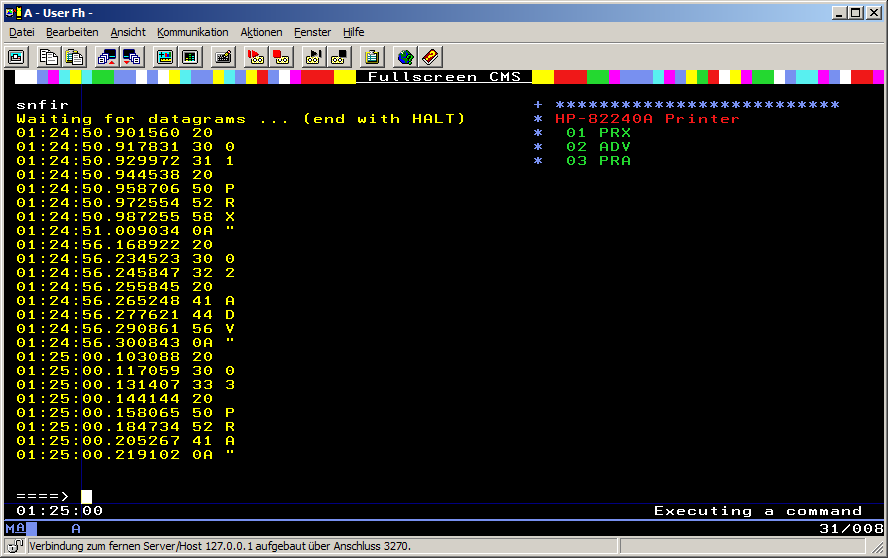 Pushing the printer keys in programming mode.